UX analysis and design documentation for System Forge, an early-stage SysML2 modeling tool. I established design foundations — ten principles synthesized from UX literature, an interface audit mapped to those principles, a phased roadmap, and concrete next-step recommendations.
The work treats documentation as design: principles and analysis that outlive individual screens and make future decisions faster and more defensible.
Context
System Forge is an early-stage model-based systems engineering (MBSE) tool built by Cauê Napier, a systems engineer at the Swedish Space Corporation. The goal: make SysML2 modeling accessible without requiring a course first.
I contribute UX analysis and design documentation as a side-project collaboration — establishing the foundations that guide development decisions downstream.
The technical challenge
SysML2 (released September 2025) specifies element semantics and core notation, but leaves presentation and interaction to individual tools. The interface must teach a complex modeling language while respecting a strict specification — so every design decision must distinguish between what the standard requires and where tooling can innovate.
Framing and Reframing
Initial framing: Support the product with UX — review screens, improve layouts.
The reframe: Before reviewing screens, define what principles those screens should follow, with learnability as the primary lens. SysML2 specifies semantics; presentation is where learning happens.
What changed: The work became scoped to design foundations, not screen fixes — principles, an interface audit mapped to those principles, and a roadmap. Principles outlive individual screens.
The standard fixes semantics. Everything else is the tool design space — and that's where the work happens.
Two Audiences, One Interface
The tool must serve two distinct learning paths simultaneously — and the interface itself has to do the teaching.
Designing for learnability
Engineers who need MBSE but haven't used SysML before. The tool should teach the language through use — progressive disclosure, clear feedback, safe exploration.
Experienced SysML users adapting to v2's new terminology. The tool should bridge old and new — showing familiar names alongside v2 equivalents.
Approach: Principles Before Pixels
For a new product with a solo designer, establishing principles early prevents arbitrary decisions later. Five phases — each feeds the next, each can be revisited when new information surfaces.
Values & decision criteria
Current state audit
Content hierarchy
First-run experience
Tokens & patterns
The order is intentional. Principles make decisions defensible rather than arbitrary. Analysis reveals where principles are supported and where gaps exist. IA defines where things live. Interaction works out how users move through tasks. Only at the end does a design system lock in component-level decisions — tokens are expensive to change once in production.
Design Principles
Ten principles synthesized from UX and information design literature, then reviewed with Cauê to ensure each held up against how systems engineers actually work. Not invented — curated from existing theory and mapped onto System Forge's context. Green marks principles that directly support learnability.
Single source of truth. Diagram, tree, table, text all sync. Shneiderman; linked views
Same meaning = same appearance. Enables pattern recognition. Bertin; Tufte
Show what the task requires, hide the rest. Miller's Law; NNGroup
Selection syncs across all views instantly. Linked views pattern
Never "zoom in and get lost." Orientation supports learning. Shneiderman's mantra
Group by element type, not creation order. Information architecture
Filter or limit edges to reduce visual noise. Tufte, Layering & Separation
Real-time vs. on-demand error checking — user controls interruption. B2B expert workflows
Generous undo, non-destructive defaults. Mistakes are cheap. Norman
Build on IDE/CAD conventions users already know. Jakob's Law
SysML2 Constraint Map
Where the specification constrains design, and where tooling can innovate. Shape and semantics are fixed by the standard. Presentation is where learnability improvements happen.
Must follow SysML2 specification
These elements carry semantic meaning. Changing their representation breaks interoperability and confuses engineers familiar with the spec.
| Element | Standard Representation |
|---|---|
| Part def | Rectangle with «part def» keyword |
| Part usage | Rectangle with «part» keyword, shows type |
| Composition | Filled diamond on parent end |
| Port | Small square on block edge |
| Connector | Line between ports |
| Requirement | Rectangle with «requirement», id field |
| State | Rounded rectangle |
| Transition | Arrow between states with trigger label |
| Initial / end state | Filled circle / bullseye |
Open to design — presentation choices
These aspects are not specified. Where tooling differentiates and where learnability improvements happen — without changing model meaning.
| Aspect | Design Freedom |
|---|---|
| Color | Not specified. Can encode element type, subsystem, status, health. |
| Size | Can encode information (node size = child count, criticality). |
| Layout | Auto-layout algorithm, spacing, alignment are design choices. |
| Hierarchy display | Containment vs. separate diagrams. |
| Edge routing | Orthogonal vs. curved. Bundling. Crossing minimization. |
| Labels | Defaults, truncation, hover expansion. |
| Filtering | What's visible by default. Filter UI design. |
| Animation | Transitions between states. Zoom behavior. |
Interface Analysis: Annotated Examples
The audit evaluated first impressions and key workflow moments. Two representative examples below.
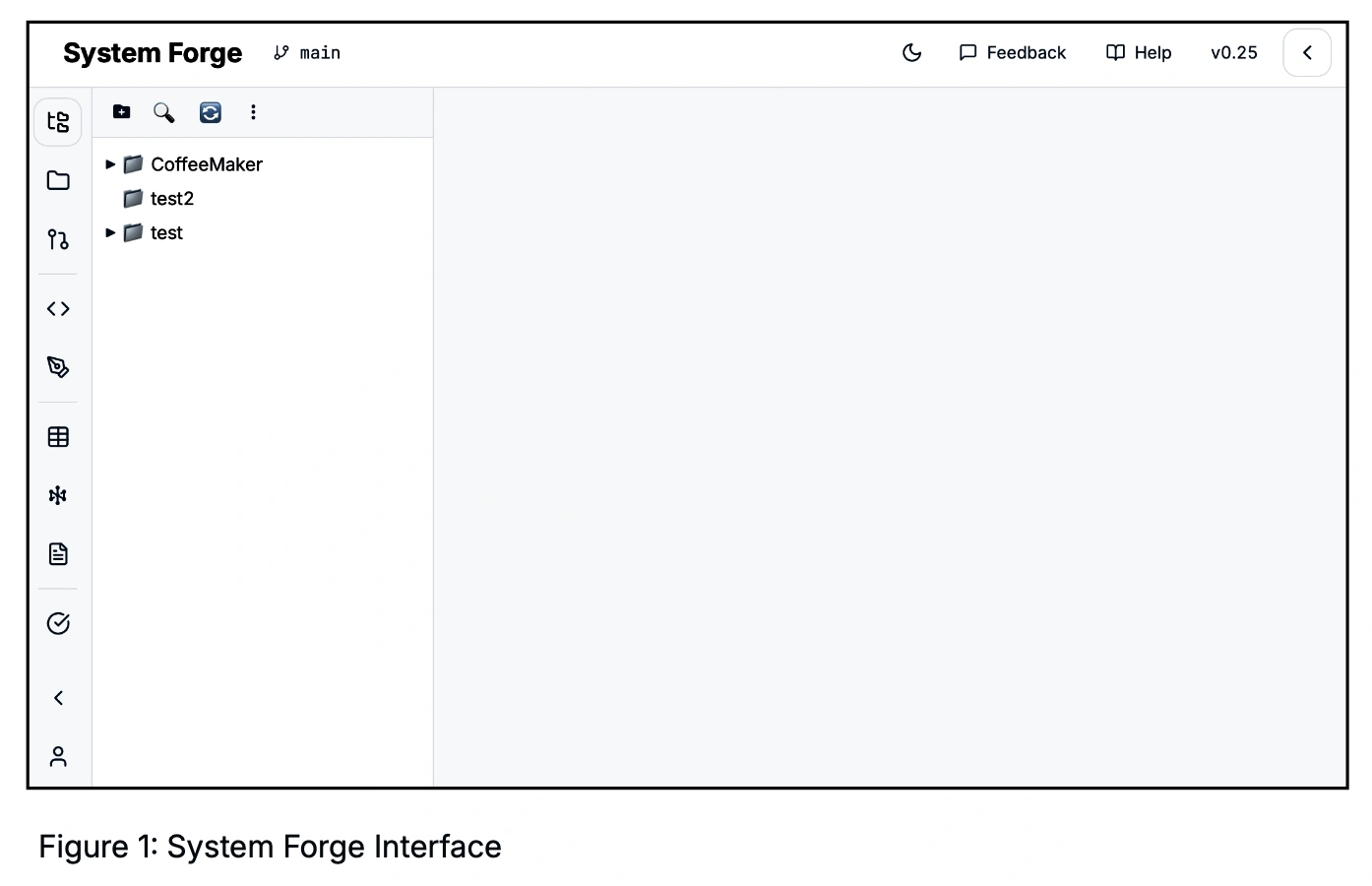
Users can identify where tools and diagrams appear. Sidebar icons logically separated by function.
Supports: Jakob's LawMore modern than most systems engineering tools on first impression. Minimal clutter supports focus.
Supports: Professional trustIcons have similar visual weight. Model Explorer could dominate — SE workflows start there.
Principle #06Mix of flat line and filled icons weakens visual grammar.
Principle #02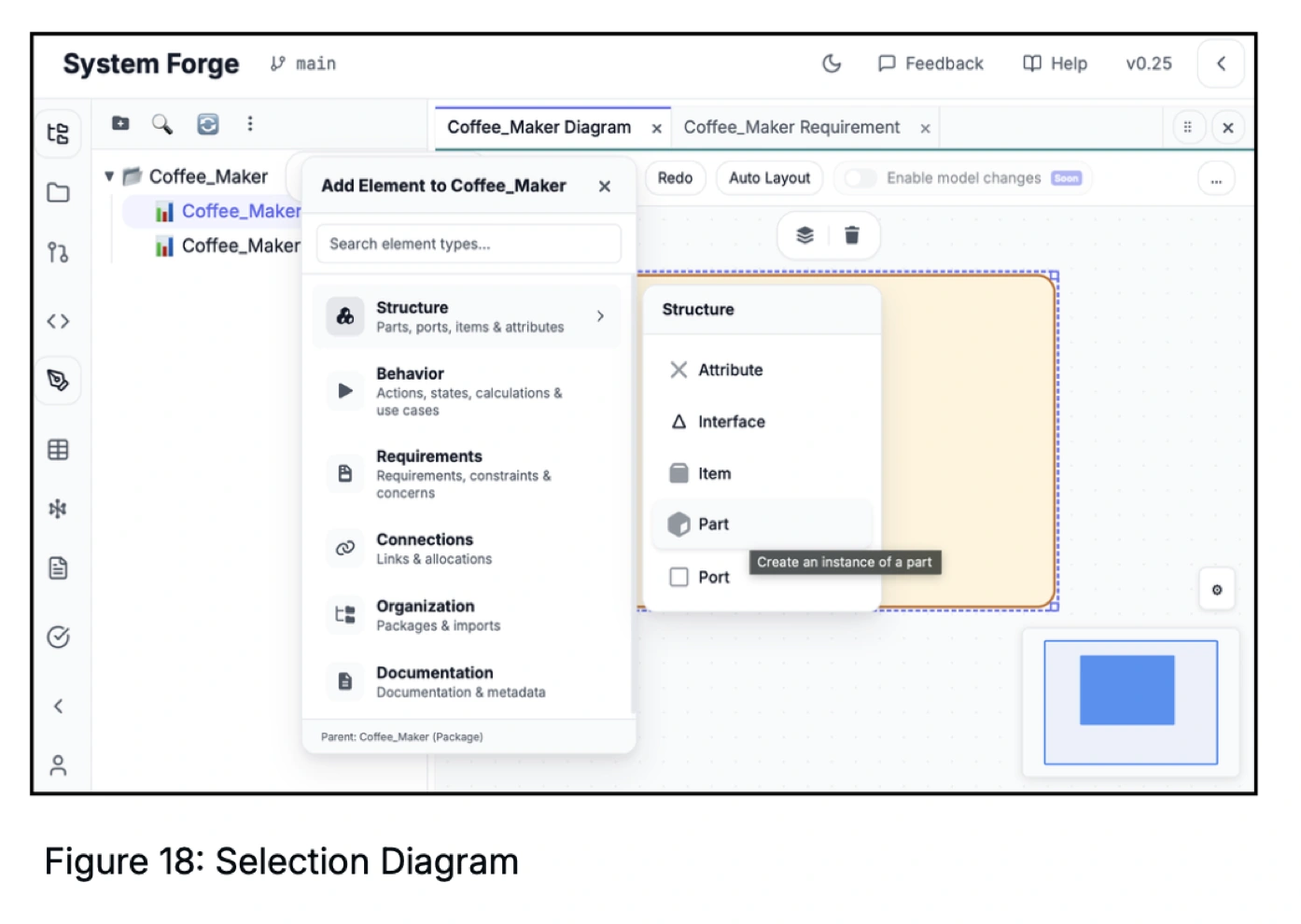
Structure, Behavior, Requirements, Connections, Organization, Documentation — not a flat list.
Supports: #06Hovering "Part" shows "Create an instance of a part" — explains SysML2 concepts where users meet them.
Supports: #03Supports both browse (novice) and search (expert) patterns in one palette.
Supports: FlexibilitySearching "Block" (v1) should surface "Part" (v2) with the old name visible. Bridges transitioning users.
Learnability: v1→v2What's Already Working
Strengths surfaced in the analysis, worth preserving as the product evolves.
Key strengths identified
Status & Recommended Next Steps
Phases don't run strictly in sequence — IA and interaction inform each other and overlap.
Ten principles synthesized from established UX literature, reviewed with Cauê.
CompleteCurrent-state audit. Observations mapped to principles; strengths and gaps documented.
CompleteModel Explorer vs. File Explorer; Views / Editors / Tools grouping.
In ProgressFirst-run experience for engineers new to SysML. A five-minute path to a working first model — covered in the companion case study below.
In ProgressTokens and patterns extracted from real onboarding work. A full design system would be premature; foundations come first.
DeferredConcrete recommendations
Near-term moves, ordered by what unblocks the most downstream work.
- Resolve Model Explorer vs. File Explorer. Most consequential IA decision — gates sidebar hierarchy, icon weight, default view.
- Add v1 → v2 terminology bridging in search. Searching "Block" surfaces "Part" with the v1 label visible. High-leverage learnability win; small implementation.
- Standardize icon style and hover behavior. Mixed flat/filled icons weaken visual grammar. One-pass cleanup before IA hardens.
- Map core workflows end-to-end. Create → add parts → connect → review/validate. Surfaces interaction gaps static analysis misses.
- Draft tooltip patterns that teach SysML2 concepts. Extend the "Part tooltip" pattern systematically — strongest lever for teaching through use.
Next · Companion Case Study
Phase 04 continues as a focused companion case study. Where this study set the foundations — principles, audit, roadmap — the next one applies them to a single concrete moment: the first five minutes for an engineer who has never seen SysML before.
Deliverables
Reflection
On documentation as design work: Principles and analysis create shared understanding and reduce rework. The analysis report and roadmap aren't byproducts — they're the foundation that makes future design decisions faster and more defensible.
On research and expert review: I'm not a systems engineer. My contribution was researching UX and information design literature and synthesizing it into principles specific to a SysML2 tool. Cauê reviewed each principle against real engineering practice — which caught things I'd have missed. The principles are grounded in theory and accurate to the domain because both steps happened.
On learnability as a design goal: Most MBSE tools assume training. System Forge asks: what if the interface itself teaches? Every tooltip, visual cue, and error message is an opportunity to help users learn — not just use — a complex modeling language.